How can I identify opportunities for training?
CLM reporting isn’t just for optimizing content; it’s also a powerful tool for sales managers to coach their teams. By analyzing how individual field users present CLM materials, managers can identify best practices, spot knowledge gaps, and ensure field users are delivering key messages effectively.
Reports can highlight patterns that indicate the need for targeted training or coaching. Some questions managers can ask and yield insights to include:
-
Are my field users using the newest presentations?
-
Is a specific field user skipping required slides, like Important Safety information?
-
Are there high-performing field users who have longer durations on key slides that others could learn from?
Let’s look at how reporting helps Sarah Jones, a regional sales manager, identify and carry out a coaching moment for one of her field users. Sarah is reviewing the CLM activity for her team. She runs a report on the Call Key Message object, grouping by Key Message Name to see how different users are performing on each slide.
To create this report:
-
Create a report with the Call Key Message report type.
-
Add the following columns:
-
Key Message Name
-
User
-
Duration
-
Reaction
-
Group the rows by Key Message Name.
-
Select Run and Save.
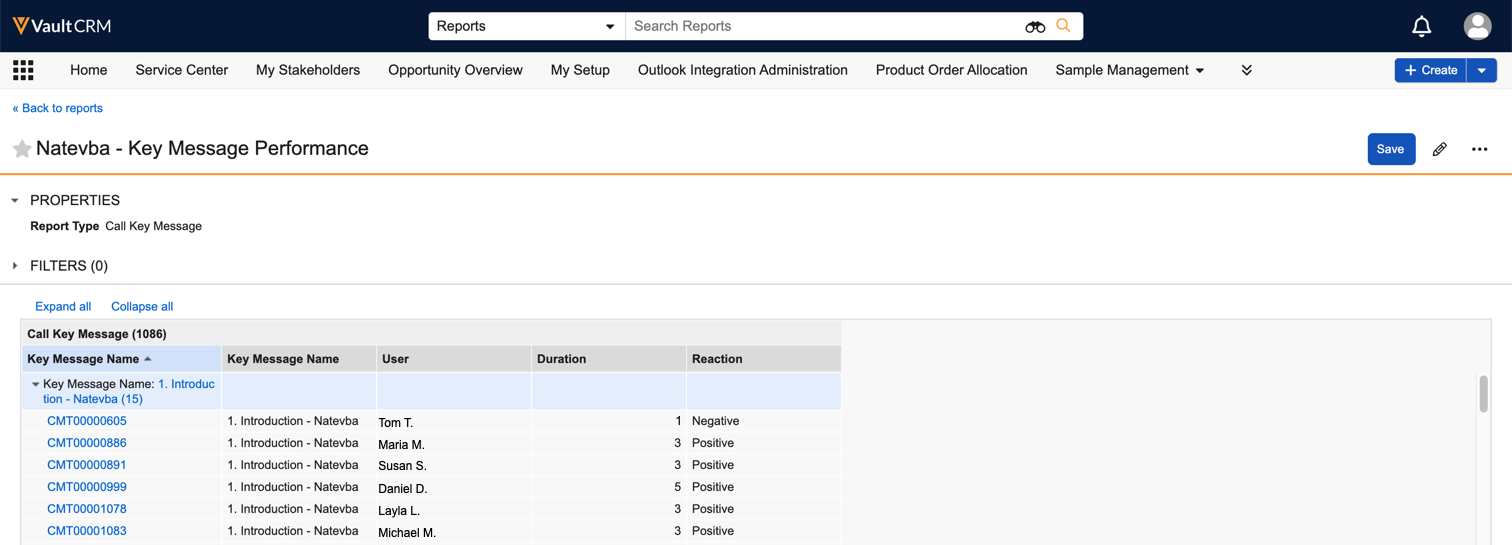
Sarah notices that one of her newer reports, Tom, has low usage and generally negative reception. In contrast, a top-performing field user, Maria, consistently spends more time on slides and records positive reactions.
This data provides Sarah with a clear coaching opportunity. During her next one-on-one with Tom, she has the opportunity to ask if Tom is comfortable with the CLM material, share educational resources, or facilitate 1-on-1s with top performers.
By using CLM reports, Sarah can go beyond generic advice and provide specific, data-backed coaching to help Tom improve his performance.