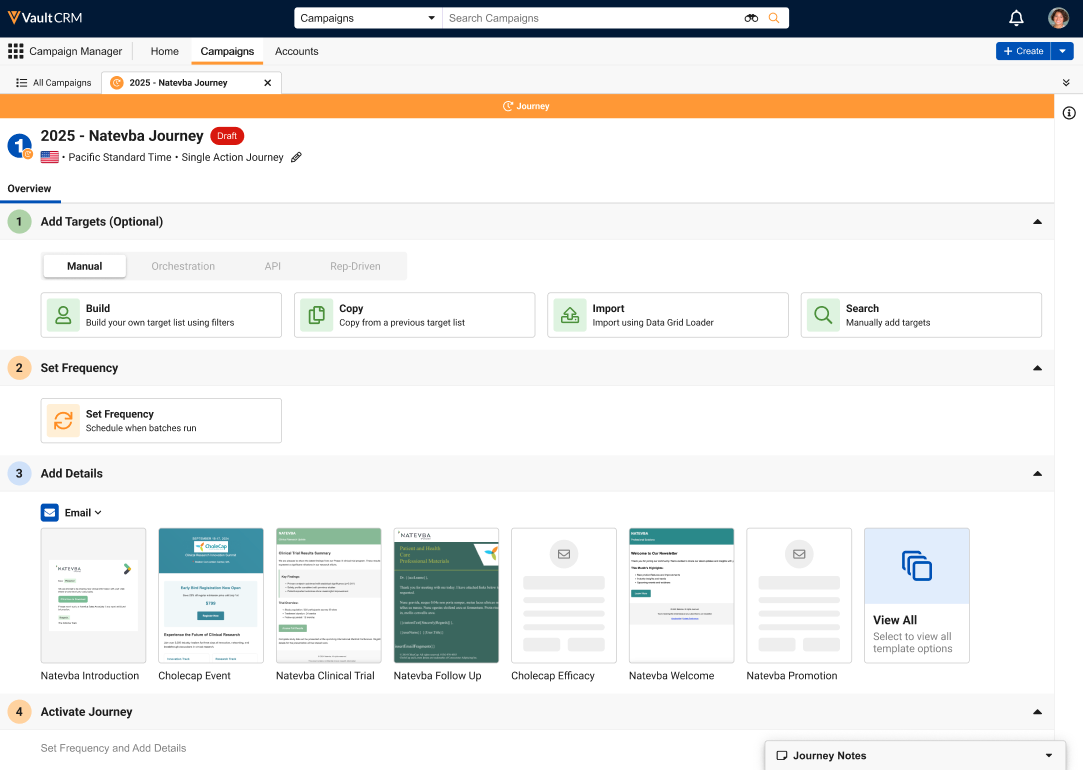
What steps are involved in building a campaign or journey?
Every campaign or journey moves through the same four core steps, whichever template you choose:
-
Add targets – This is where you define exactly who the campaign or journey reaches. Campaign Manager offers four ways to build that list:
- Build a list by filtering on fields and objects with the Target List Builder
- Copy the list from an existing campaign or journey
- Import targets from a spreadsheet using the Data Grid Loader
- Search for and add individual accounts
Once your list is in place, you can review and refine it, remove anyone who shouldn't be there, and even export the list to Excel or CSV.
-
Add details – This is where you choose the channel(s) and enter necessary details for any and all actions. The following channels are available:
- Email – An email sent from a defined marketing email address
- Field Email – An email sent on behalf of field users based on territory assignments. Includes optional field review so your field users can review and approve communications sent to accounts on their behalf.
- Field Action – A Suggestion assigned to field users in Vault CRM, either in the form of a suggested email or suggested call.
- Activate – Your campaigns and journeys can be either activated immediately, or scheduled for a specific date and time. For journeys, this is where you also define the end date of the journey.
- Monitor performance – Once the campaign or journey is active, you can track its key metrics to see how it's landing with your targets, providing real evidence of what's working so subsequent outreach efforts are even sharper.