How can I ensure Chat messages are compliant?
Vault CRM offers two main methods to help you manage chat compliance. Let’s explore these two approaches so you can build a robust compliance strategy with Engage Chat using one or both of these approaches.
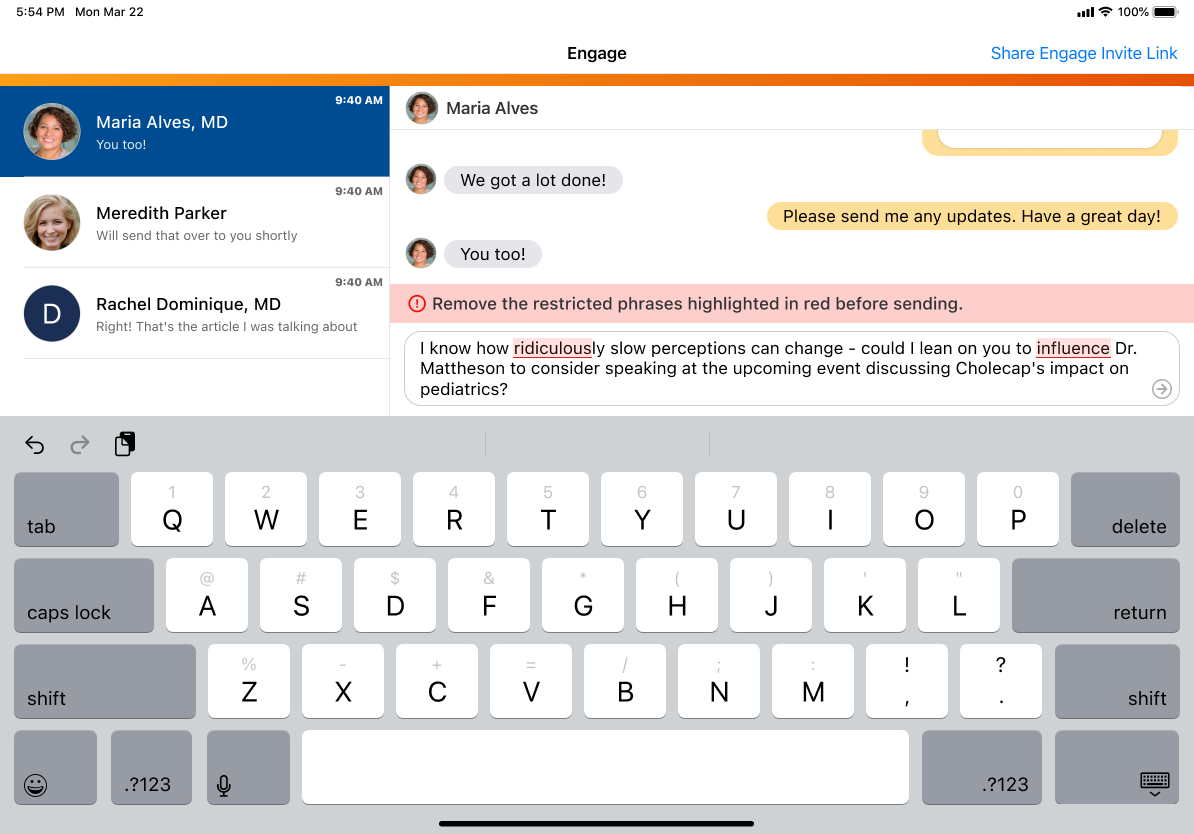
Proactive blocking via Restricted Phrase Rules
You can use Restricted Phrase Rules to completely prevent Chat messages with specified words or phrases from being sent.
When a user enters a restricted word or phrase, the restricted text is highlighted and the send button is disabled. The user cannot send the message until they remove the restricted text.
Reactive monitoring via Approved Notes
While some words and phrases are always off-limits, others may be permissible in some contexts but not in others. Instead of blocking a message from being sent, this method flags the Chat conversation on the backend to be reviewed by the compliance team.
Using Approved Notes allows your organization to specify words and phrases to consider as potentially non-compliant. Once Chat conversations are imported into Vault CRM and assessed for potential violations using Approved Notes, flagged chat messages can be easily accessed and reviewed by the compliance team.
Check out our introduction Flightpath to Approved Notes.
Compliance strategies at a glance
| Feature | Use Case | How it Works |
|---|---|---|
| Restricted Phrase Rules |
Proactive blocking of forbidden words Examples: guarantee, cure, 100% safe |
Prevents the message from being sent by the user |
| Approved Notes | Reactive monitoring of nuanced or context-dependent words requiring human review Examples: off-label, pediatric | Flags messages on the backend for later review by the compliance team after the message has been sent |