How do Pricing Rules determine list prices and discounts?
Pricing rules are a core capability of Order Management. They are automatically applied to each product depending on the commercial conditions of the order, as well as the specific products and quantities ordered.
Pricing rules use three different comparison types to determine if a rule applies to a product:
- Product Quantity - Compares the pricing rule's minimum and maximum quantity with the product quantity
- List Value - Compares the pricing rule's quantity limits with the product quantity multiplied by the product's list amount
- Net Value - Compares the pricing rule's quantity limits with the product quantity multiplied by the product's net amount after discounts are applied

|
Pricing rules determine the list price, discounts, free goods, allowed quantities, payment terms, and delivery periods applied to the order and order lines. |
Let’s look at an example:
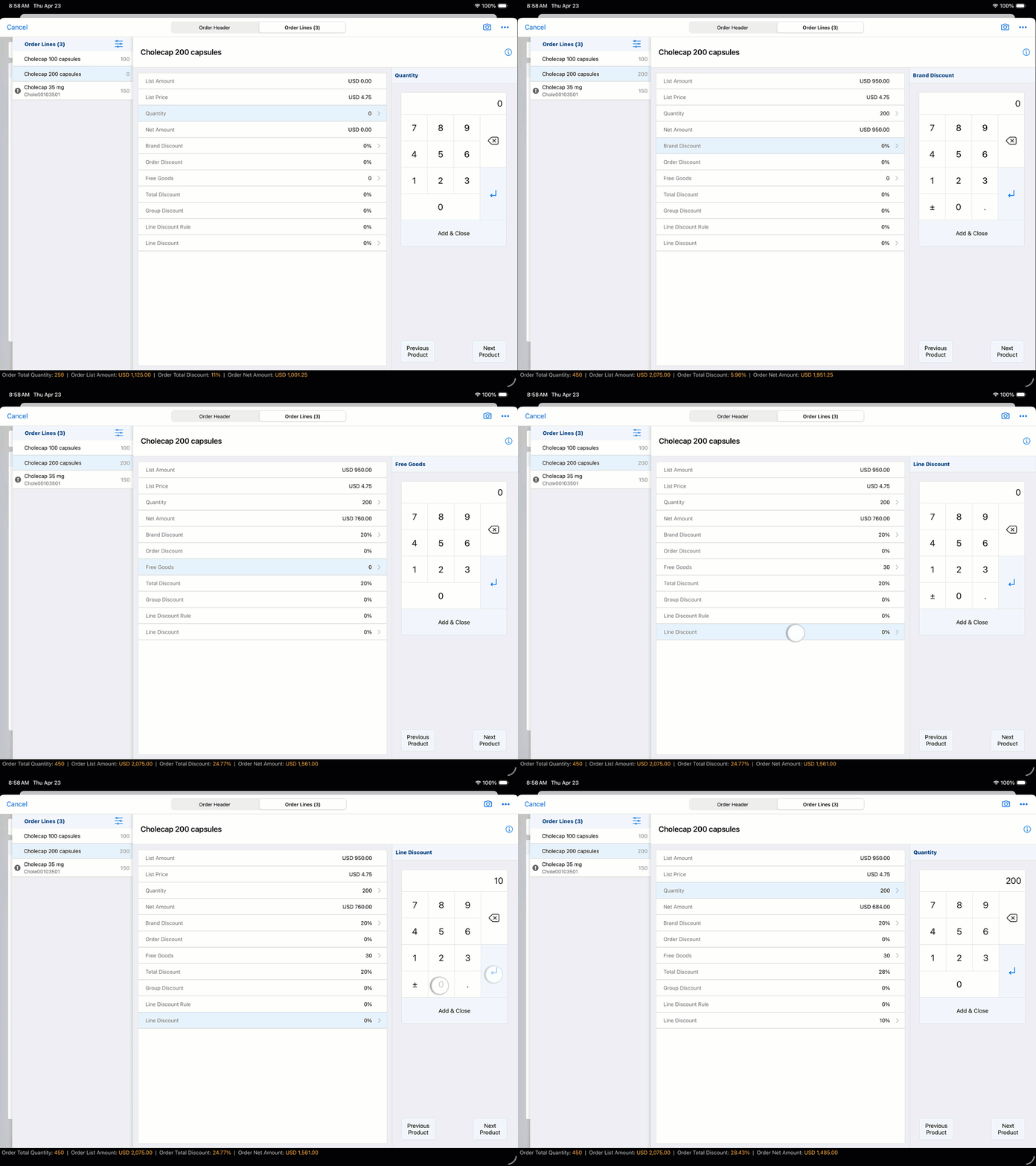
You add 200 units of Cholecap 200mg capsules to the order form. The system immediately references the back-end pricing rules to calculate the cost. As you adjust quantities, Vault CRM runs the three comparison types in real-time. On the order, you don't see the complex math; instead, the pricing rules manifest as automatic line-item updates.
You don't have to memorize which volume triggers a discount. No manual "Apply Discount" button is needed; the price shifts as the quantity is typed. And the system prevents you from offering discounts and free goods that don’t meet the requirements set by your finance department.