How is my Agentic Call Report built?
After selecting Create Call, Agentic Call Capture interprets the unstructured audio and automatically transposes the details into a structured call report layout.
Existing calls are automatically reviewed for potential matches. Agentic Call Capture identifies potential matching calls by date, time, and accounts mentioned, and categorizes them as Suggested Calls or Available Calls. If only one Suggested Call matches the information in your Call Voice Note, the dictated information is automatically added to your existing call report.
If there are multiple potential matches, you can select one from the list displayed.
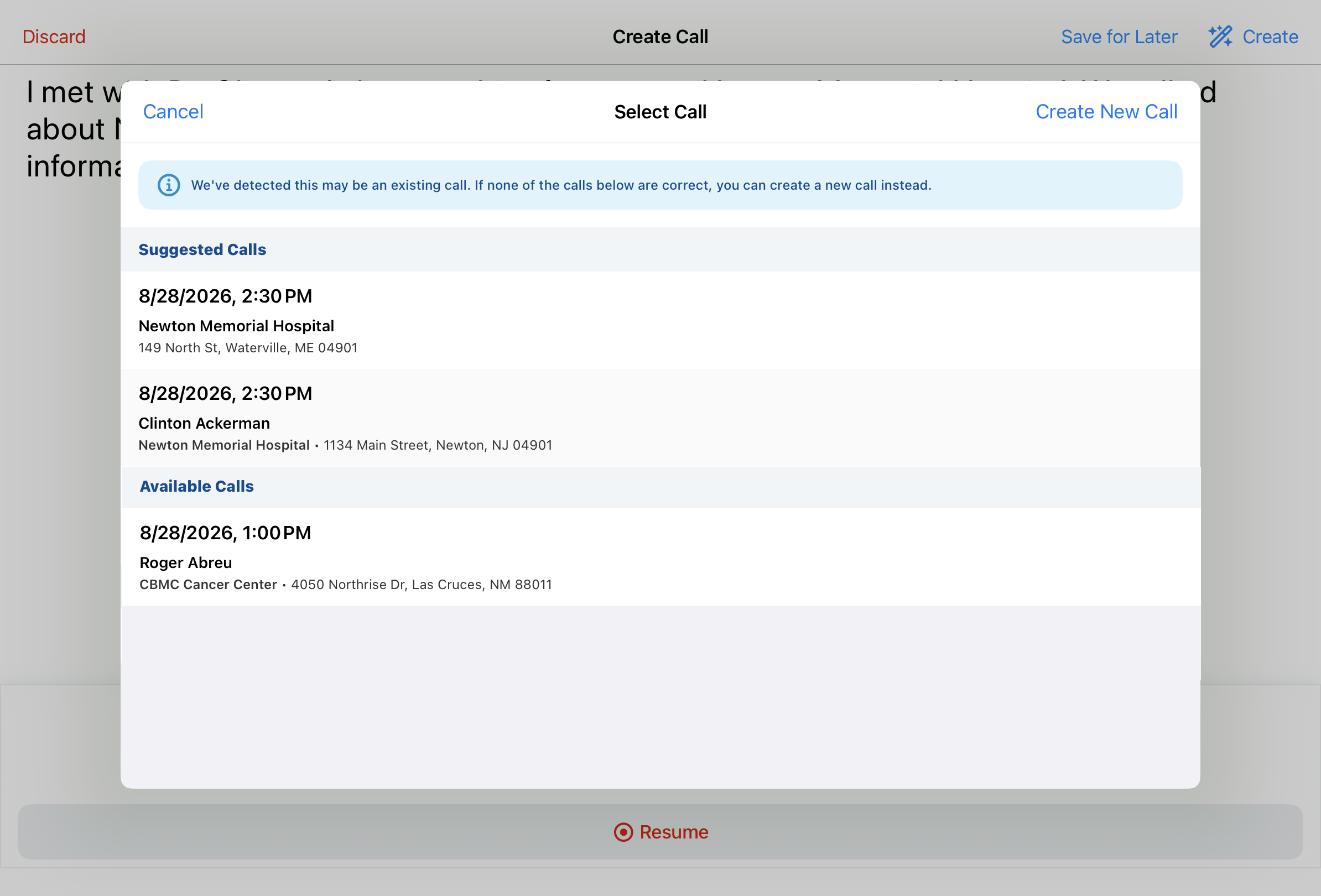
If none of the Available or Suggested Calls are a good fit, you can still select Create New Call to proceed with the new call report.
After adding to an existing call or creating a new call, simply review the record to ensure everything is captured. Much of the call information was handled automatically—fields you would have typed one by one are already filled in, mapped directly from the voice dictation. By default, the Agentic View displays, enabling quick review. Users can toggle to the input mode for editing.

The following fields are populated based on your dictation:
-
Account — Agentic Call Capture searched your territory for "Dr. Clinton Ackerman" and found one Person Account match, populating the account automatically. If it had found multiple matches, it would have presented a Suggested Accounts list to choose from. If no match was found at all, an account search modal would display so you could locate the right record manually.

To make sure the agent gets the attendee selection right, automatically adding an attendee without any user intervention is only possible when you start recording from an account-specific entry point, like the Account Detail page, and there is a strong, single match for the account name you mentioned.
-
Call Location — Because the transcript said "in-person meeting at Newton Memorial Hospital," and the Parent Call Account Type Preference in the Vault is set to Prefer Person Accounts, Agentic Call Capture uses Newton Memorial Hospital as the call location after setting Dr. Ackerman as the primary account on the call. If a specific location was not mentioned, it would have defaulted to the matched account's primary address.
-
Call Channel — "In-person meeting" maps to the In-Person channel. Agentic Call Capture recognizes all standard channels—In-Person, Video, Phone, Email, Text/Message, and Other—in any supported language, and respects any admin-configured restrictions on call channels.
-
Call Date and Time — Because the transcript explicitly stated a date and time, Agentic Call Capture uses that rather than the recording timestamp. When no date or time is mentioned, the timestamp of the recording is used as the default. Any call backdate limits defined by the organization are respected.
If you decide to select Cancel on an unsaved report, the call report is discarded, but the original Call Voice Note is automatically saved for later. Access the saved Call Voice Note at your leisure, from either the My Notes tab or My Schedule.
Call Attendees
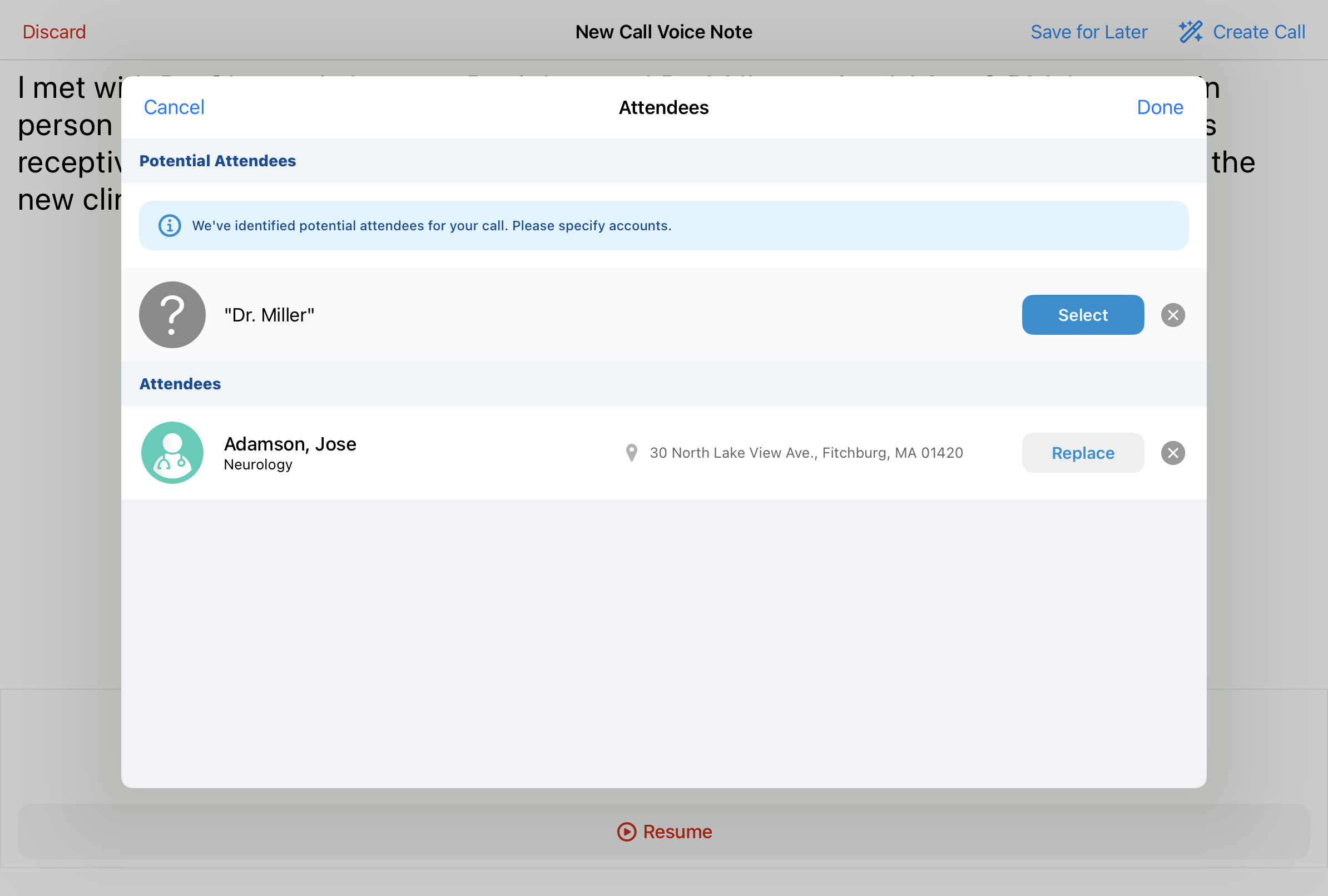
The Voice Note includes a mention that Dr. Adamson and Dr. Miller were present during the visit. Agentic Call Capture searched your territory for matching accounts. "Dr. Adamson" returned a strong match—Jose Adamson—and was added automatically. "Dr. Miller" returned multiple possible matches, so Agentic Call Capture presents a Potential Attendees list to confirm the right person before the record is finalized.
Product Details
The Voice Note transcript included two products: Restolar and Natevba. Agentic Call Capture populated both entries in the Detail Products section automatically.
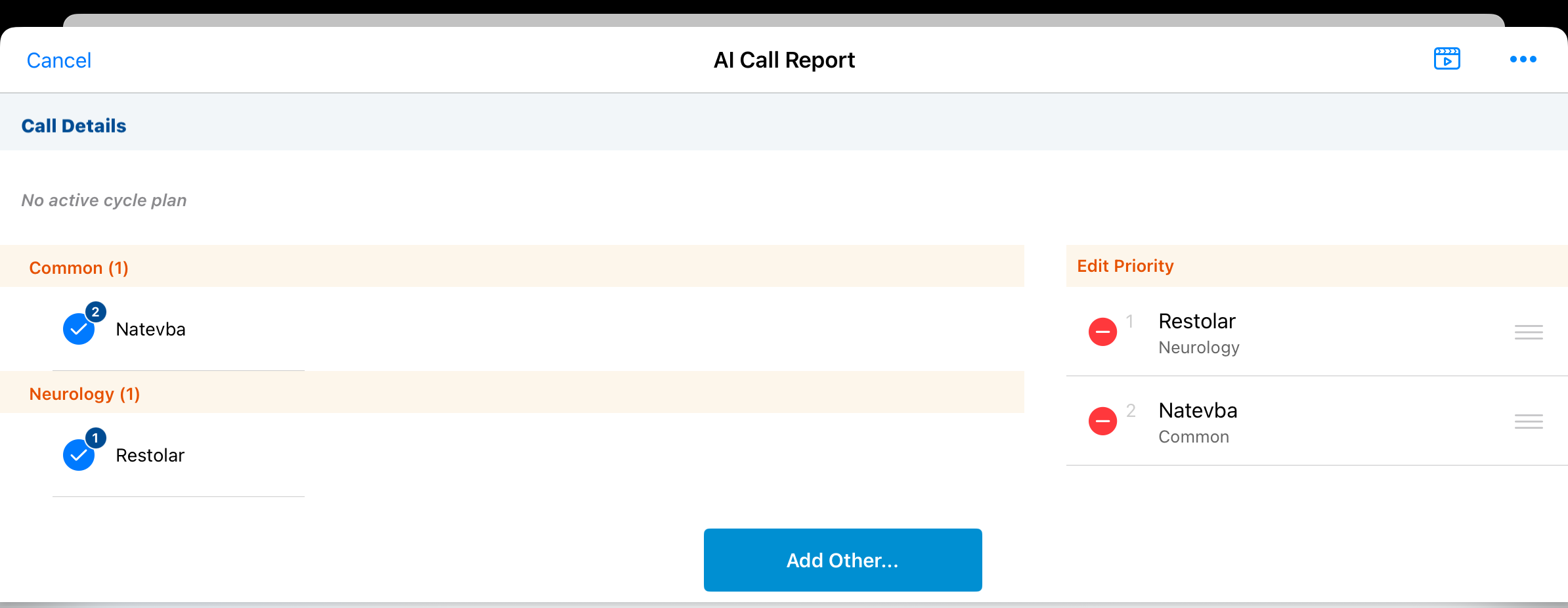
If a product belongs to multiple Detail Groups and you didn't specify one, Agentic Call Capture leaves it off rather than guess. Semantic matching applies: for example, the phrases"Cholecap for heart health," "Cholecap for cardiology," and "Cholecap for cardiovascular patients" all map to the same Detail Group.
Key Messages
Since the transcript said Dr. Ackerman "was receptive to the data and wants to learn more about new products," Agentic Call Capture did two things. It matched "receptive" to a Reaction value on the call report and populated that field accordingly. It also matched the discussion of Restolar and Natevba against the Name, AI Description, and AI Synonym fields on your active Key Message records, identifying the relevant messages for each product and confirming they were appropriate for Dr. Ackerman's segment before populating them.
Follow-Up Activities
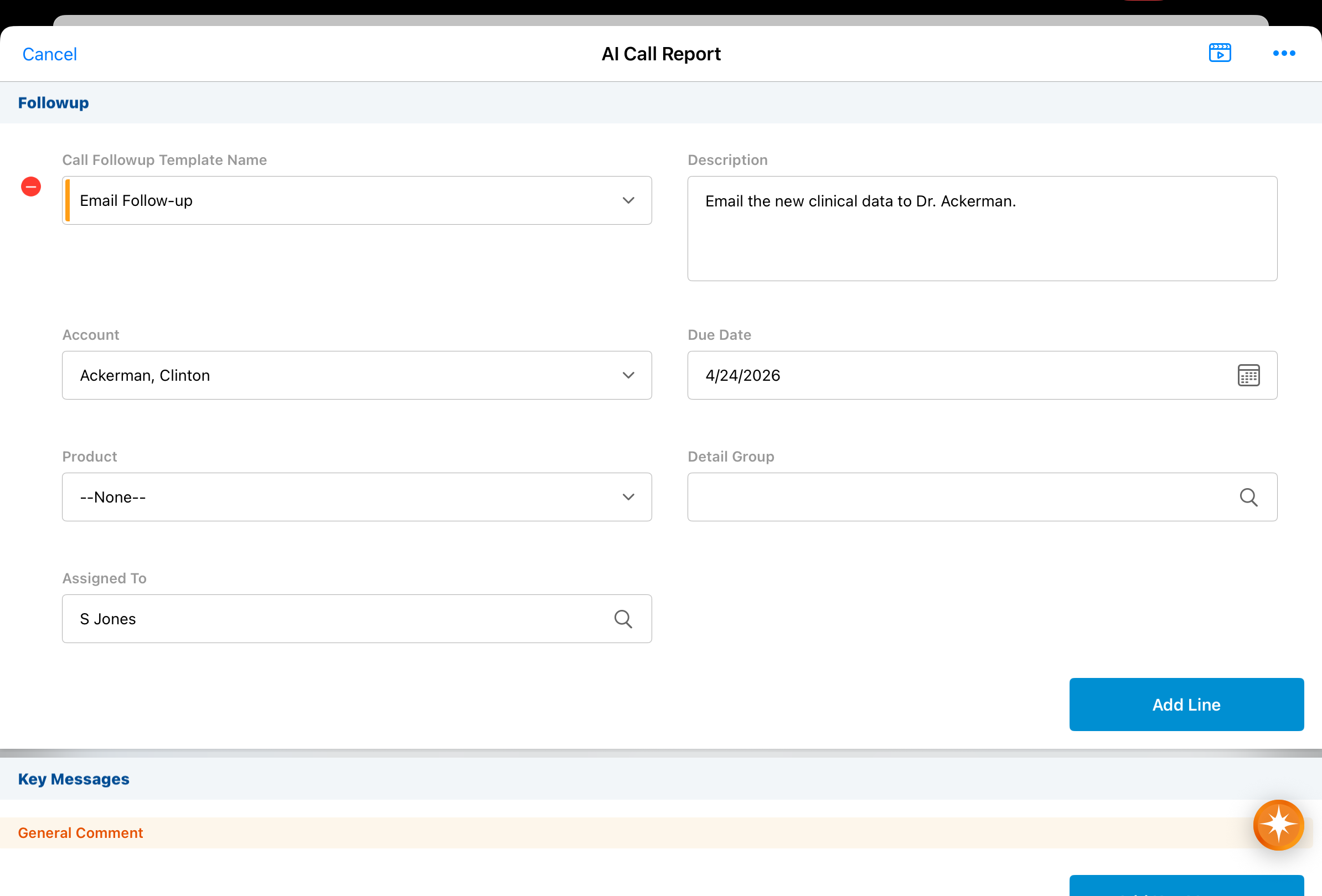
Agentic Call Capture picks up on a mention of a needed follow-up: “I said I would email the new clinical data to Dr. Ackerman by next Friday.” This becomes a follow-up activity on the call report with account, assignee, due date, and description all populated automatically.
Call Text
The full content of the Voice Note is pre-populated in the Call Text field. When Agentic Text Monitoring is enabled, that content is automatically checked for potential compliance issues.
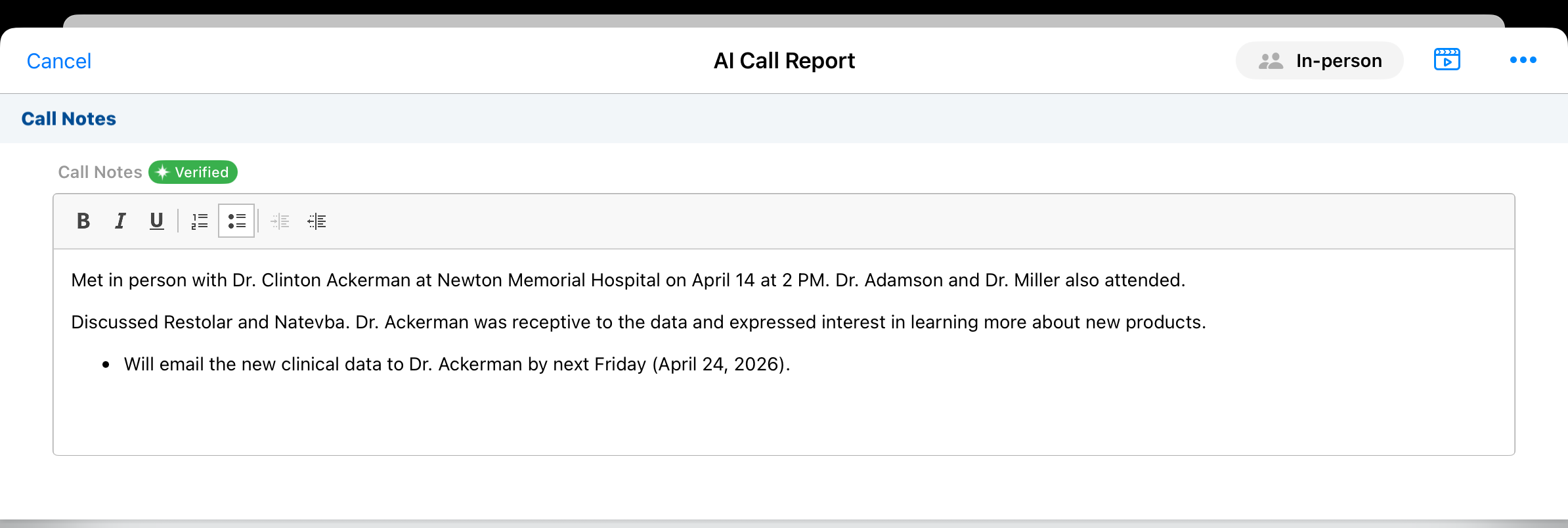
Read on for more on how Agentic Text Monitoring safeguards compliance.