How do I launch Agentic Call Report™ to document interactions?
Let’s say you successfully completed a face-to-face conversation with Dr. Ackerman, well-prepared by your field preparation from Conversational AI. After the visit, you want to capture the interaction details immediately, while they are fresh in your mind. Launch the Agentic Call Report workflow by stating a clear intent in Conversational AI: "Log a call for this account."
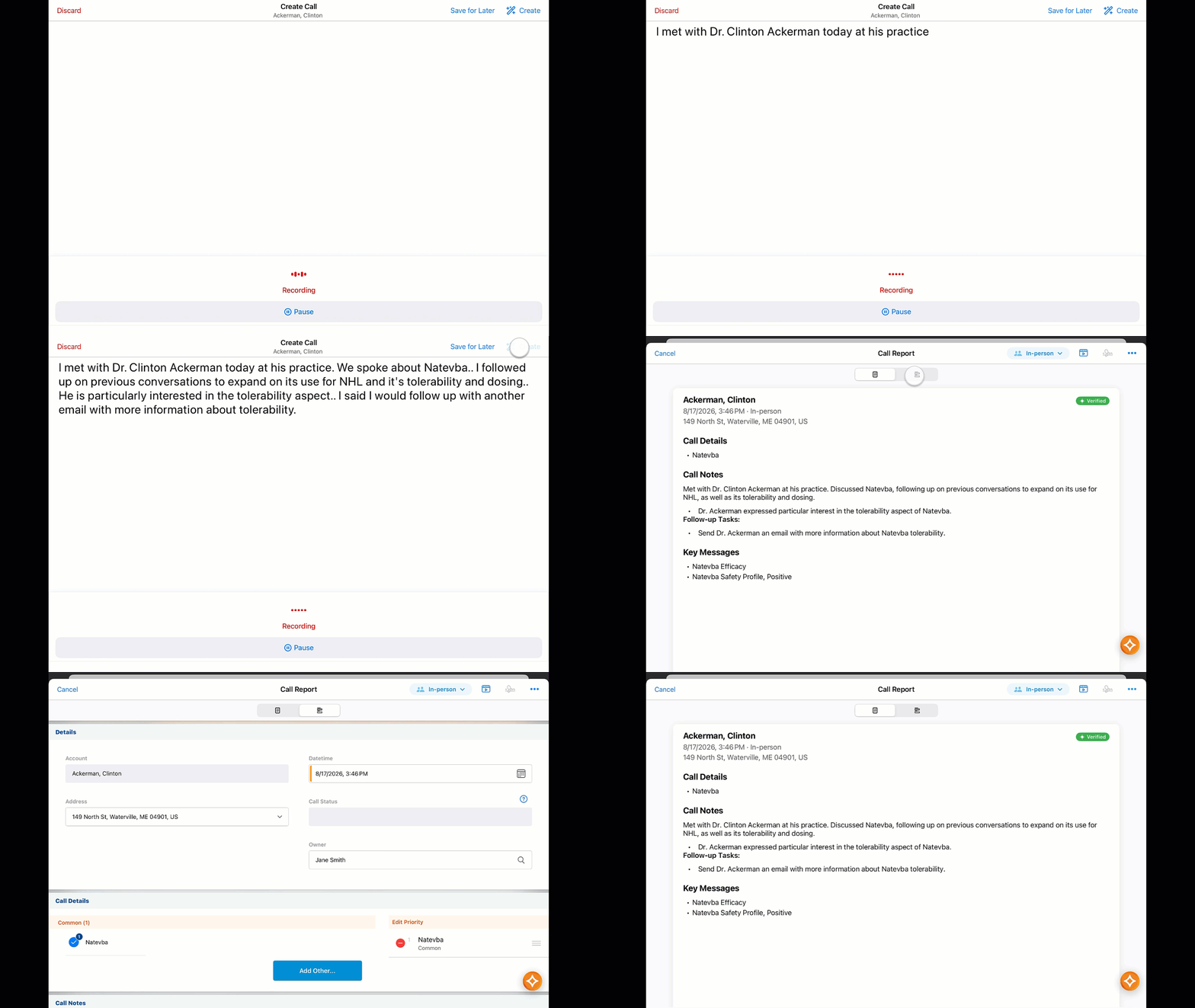
The AI identifies the correct account record, prompts for clarification if the account is not clear, confirms the request, and opens a Call Voice Note for you to start dictating the details of the interaction.
Dictate the details of the visit clearly. Once speaking finishes, select Create Call to transform the dictated notes into an Agentic Call Report. The system pre-populates this report with relevant information extracted directly from the verbal summary.
The field preparation and visit documentation that used to require hours now takes minutes—unlocking faster preparation, deeper research, better insights, and more time for HCP interactions.